
Finding the right hobby CNC laser cutting machine can feel like a daunting task, especially with so many options on the market and all the technical jargon involved. This guide is here to cut through the noise and focus on what truly matters—highlighting the best hobby CNC laser cutting machines that deliver value, performance, and reliability without being overshadowed by flashy marketing claims. Whether you’re a beginner or an experienced maker, the goal is to help you make an informed choice that fits your needs and budget.
What Is a Hobby CNC Laser Cutting Machine?
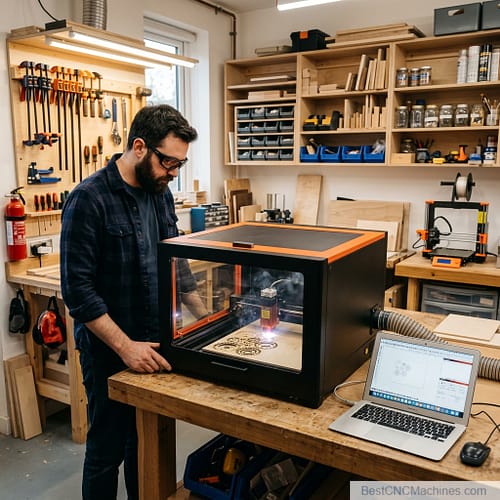
Let’s start with the basics, because not everyone grew up with a soldering iron in one hand and a Dremel in the other. A hobby CNC laser cutting machine uses a computer-controlled laser beam to cut or engrave materials like wood, acrylic, leather, cardboard, and in some cases, thin metal. “CNC” stands for computer numerical control, which is a fancy way of saying the machine follows a digital design file with a precision no human hand can match, repeatedly, without getting tired or cutting itself.
These machines have found their way into garages, spare bedrooms, and small business workshops across the country. People use them to make signage, personalized gifts, jewelry, home décor, prototypes, and small-batch products to sell on Etsy. Some hobbyists use them purely for fun—there’s something deeply satisfying about watching a design burn itself into a piece of wood in real time. Others have turned a laser cutter into a legitimate side hustle, and a few have built entire businesses around one.
Why Laser Cutting Appeals to Hobbyists and Small Business Owners
There’s a reason laser cutting has exploded in popularity over the last several years, and it’s not just because it looks cool on Instagram (though it does). For hobbyists, laser cutters offer a level of precision and repeatability that hand tools simply can’t match. You can design something once and reproduce it perfectly a hundred times over. That’s a big deal if you’re making custom ornaments, engraved cutting boards, or intricate wall art.
For small business owners, the appeal is even more practical. A hobby-grade laser cutter is a relatively low-cost way to test product ideas, produce small batches, and offer personalization—something big manufacturers can’t easily compete with. You don’t need a warehouse or a six-figure investment. You need a spare corner of your garage, a laptop, and a machine that won’t let you down.
There’s also the satisfaction factor, which I think gets undersold. There’s something honest about making a physical object appear from a digital design. It scratches an itch that a lot of people in this country have been missing—the itch to build something real with your own two hands, even if a laser is doing the cutting.
Key Factors to Consider When Choosing a Machine
Before we get into specific machines, let’s talk about what actually matters when you’re shopping for a hobby CNC laser cutting machine. This isn’t a purchase you want to make based on a flashy YouTube thumbnail.
Power and Cutting Capability
Laser power is usually measured in watts, and it directly affects how thick a material you can cut and how fast you can cut it. A lower-wattage laser (5-10W) is fine for engraving and cutting thin materials like paper, cardboard, and thin wood. If you want to cut through 1/4-inch plywood or acrylic in a single pass, you’ll want something in the 20W-40W range or higher. Diode lasers and CO2 lasers behave differently too—CO2 lasers generally offer more power and versatility, including the ability to cut certain metals with the right setup, but they come at a higher price point.
Material Compatibility and Versatility
Not every laser cutter can handle every material. Some machines are better suited for wood and leather, while others handle acrylic and fabric with ease. If you plan on working with a variety of materials—which most hobbyists eventually want to do—look for a machine with a broad compatibility range and check user reviews for real-world results, not just manufacturer claims.
Price Range and Budget Considerations
Hobby CNC laser cutters range from around $300 for basic diode lasers to $6,000 or more for enclosed, high-powered CO2 systems. It’s tempting to go cheap, but remember: a laser cutter is only as good as its safety features, its software support, and its ability to hold up over hundreds of hours of use. Buy the best machine your budget allows, and factor in the cost of materials, ventilation, and accessories.
Ease of Use and Learning Curve
Some machines are nearly plug-and-play. Others require you to build the frame yourself, calibrate the optics, and troubleshoot firmware issues before you cut your first piece. If you’re new to this, look for a machine with a reputation for being beginner-friendly, with clear instructions and an active user community.
Software Compatibility and Design Support
Your laser cutter is only as good as the software running it. Some machines come with proprietary software that’s polished and easy to use. Others rely on open-source programs like LightBurn, which offers more flexibility but requires a bit more effort to learn. Check what design file formats are supported (SVG, DXF, etc.) and whether the software plays nicely with design programs you already know, like Adobe Illustrator or Inkscape.
Safety Features and Certifications
This one’s not optional, folks. Lasers powerful enough to cut wood are also powerful enough to start a fire or damage your eyes if you’re not careful. Look for machines with enclosed designs, flame detection, automatic shutoff, and proper ventilation systems. If you’re working in a shared living space, this matters even more.
Top Hobby CNC Laser Cutting Machines
I researched the current market and focused on machines available through major retailers like Amazon.com and ToolsToday.com, prioritizing ease of purchase and manufacturer support. Here are five standout options worth considering.
1. Glowforge Aura
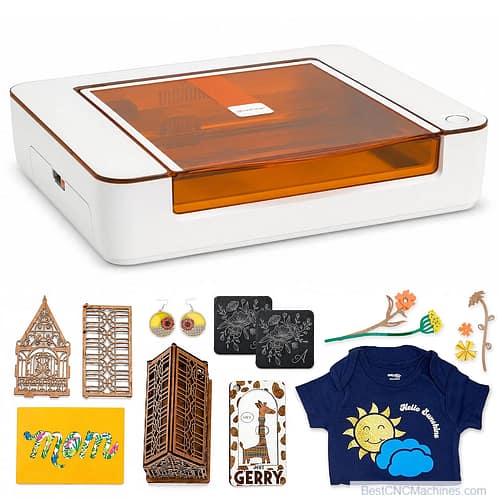
The Glowforge Aura is an accessible, compact version of Glowforge’s renowned Pro series, making it especially appealing for hobbyists and small-scale makers. Glowforge products are known for their beginner-friendly design and polished software ecosystem, offering precision and ease of use.
Specifications:
- 6W CO2 laser
- Cutting area: 11 x 12 inches
- Cloud-based software (requires internet connection)
- Compatible with wood, leather, acrylic, fabric, cardboard, and more
Pros:
- Sleek, compact design perfect for small workspaces
- User-friendly interface and setup ideal for beginners
- Built-in HD camera for alignment and design previews
- Active community forum and support resources
Cons:
- Requires consistent internet connectivity for use
- Smaller cutting area compared to larger models
- Proprietary software limits flexibility for customization
Price: Around $3,000
Where to buy: Available directly on Amazon.com from authorized sellers.
2. xTool S1
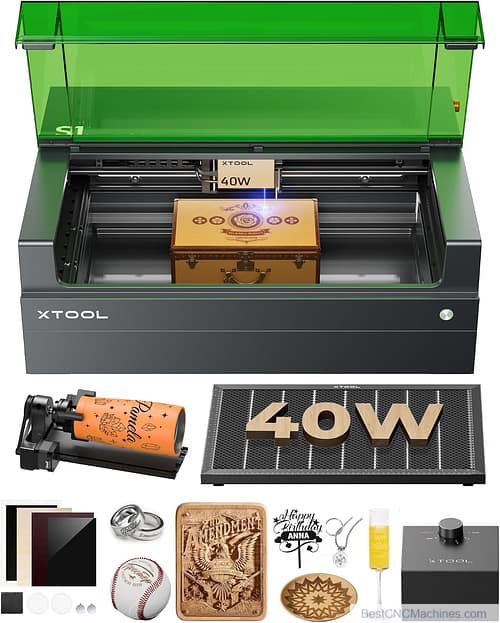
The xTool S1 is a compact and versatile diode laser cutter and engraver, offering hobbyists and small business owners an affordable yet powerful tool for a wide range of projects. Its sleek design and advanced features make it a favorite among creators who value precision and ease of use.
Specifications:
- 10W or 20W diode laser options
- Cutting area: 15 x 15 inches (extendable with accessories)
- Compatible with xTool Creative Space and LightBurn
- Works with wood, leather, acrylic, glass, and coated metals
Pros:
- High-precision laser output for clean cuts and detailed engravings
- Easy setup, making it beginner-friendly
- Compact, space-saving design ideal for home workshops
- Strong customer support and active user community
- Works seamlessly with popular software like LightBurn
Cons:
- Open-frame design requires safety goggles and proper ventilation
- Assembly required out of the box
- Limited cutting depth compared to high-power CO2 lasers
Price: $400-$600 depending on your chosen wattage configuration
Where to buy: Widely available on Amazon.com
3. OMTech Polar2 50W CO2 Laser Engraver
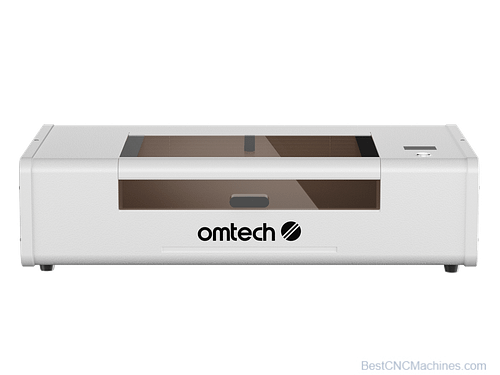
OMTech’s Polar2 desktop model is the successor to their popular Polar, offering the power of a CO2 laser in an affordable, compact unit. Designed for precision engraving and cutting on a variety of materials, it remains a top choice for small businesses and hobbyists alike.
Specifications:
- 50W CO2 laser
- Cutting area: 20 x 12 inches
- Compatible with LightBurn and CorelDRAW
- Cuts wood, acrylic, leather, fabrics, and some coated metals
Pros:
- Compact and affordable CO2 laser option
- Autofocus feature ensures clean cuts and engravings
- Integrated cooling system for prolonged operation
- Active and supportive user community
Cons:
- Requires active ventilation for safety
- Slight learning curve for software setup
- Service support can take longer due to high demand
Price: Around $2,800
Where to buy: Available on ToolsToday.com and Amazon.com from official distributors.
4. Snapmaker Artisan Premium 3-in-1 Desktop CNC Carving Machine
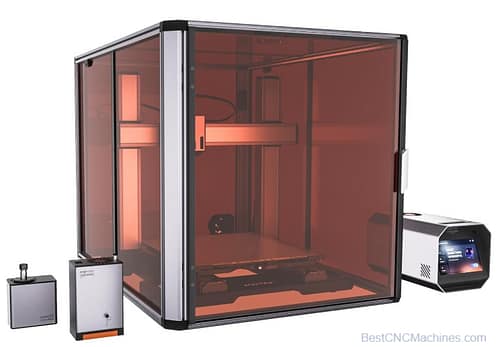
Looking for a CNC carving machine that pulls its weight? The Snapmaker Artisan Premium 3-in-1 is the honest answer, and it’s available right now on Amazon.com.
Here’s the deal: this is a 3-in-1 desktop fabrication machine. One tool, three jobs. That means less clutter on your bench and more actual work getting done.
What it does:
- 200W CNC carving module — cut and carve wood, plastics, and softer materials with real muscle behind it.
- 3D printing — build up parts and prototypes layer by layer.
- Laser engraving and cutting — mark, etch, and slice with precision.
Now, let’s be straight with you. This isn’t a dedicated industrial router built to run all day in a production shop. It’s a versatile desktop solution for the maker, the tinkerer, and the small-shop craftsman who wants serious capability without giving up the whole garage.
The 200W CNC module handles the messy, satisfying work of carving. Swap the tool head, and you’re printing or lasering by lunchtime. That kind of flexibility earns its spot on your bench.
Bottom line: if you want a capable CNC carving setup that also prints and engraves, the Snapmaker Artisan Premium 3-in-1 is ready to work — and you can grab it today on Amazon.com.
5. Creality Falcon2 Pro
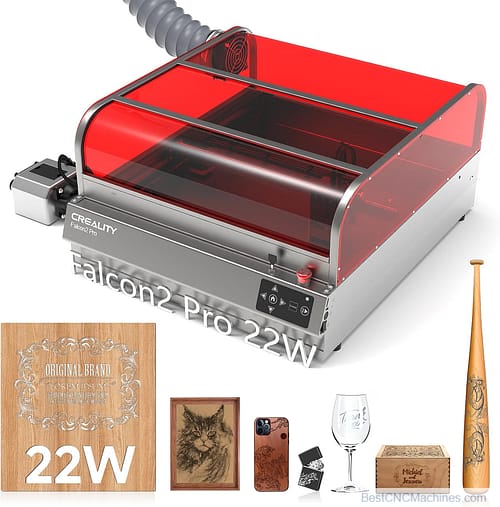
The Creality Falcon2 is a powerful and reliable laser engraver that caters to hobbyists and small businesses alike. Creality, a well-known brand in the maker space, is actively developing and supporting its product lineup, making the Falcon2 a trustworthy option for those looking for performance and precision.
Specifications:
- 22W diode laser
- Cutting area: 15 x 15 inches
- Works with wood, leather, acrylic, and coated metals
- Compatible with LaserGRBL and LightBurn
Pros:
- High cutting power for quick, efficient projects
- Advanced safety features, including laser shields and heat detection
- User-friendly setup and interface
- Sturdy aluminum frame for stability during operation
Cons:
- Open-frame design requires extra ventilation and safety precautions
- Slightly higher price point compared to entry-level models
- Software calibration may take some trial and error
Price: Around $700-$800
Where to buy: Widely available on Amazon.com
Comparison Table
|
Machine |
Power |
Cutting Area |
Price |
Best For |
Key Features |
Pros |
Cons |
|---|---|---|---|---|---|---|---|
|
6W CO2 |
11″ x 12″ |
~$3,000 |
Easy entry for hobbyists in small spaces |
Compact size, cloud-based software, HD camera |
Beginner-friendly, sleek design, strong support |
Requires constant internet, proprietary software limits flexibility |
|
|
10W/20W diode |
15″ x 15″ |
$400-$600 |
Hobbyists wanting strong value and precision |
Extendable work area, LightBurn compatibility, strong cutting precision |
Affordable, tutorial-rich community, compact design |
Open frame needs additional safety precautions |
|
|
50W CO2 |
20″ x 12″ |
~$2,800 |
Budget-conscious creatives needing precision tools |
Autofocus feature, compatible with LightBurn and CorelDRAW |
Affordable CO2 power, integrated cooling system |
Software learning curve, slower customer support response |
|
| Creatlity Falcon2 Pro |
22W diode |
13.9″ x 15.3″ |
$900-$1900 |
Hobbyists looking for an affordable, speedy laser |
LightBurn compatibility, quick engraving speeds, sturdy frame |
Budget-friendly, fast engraving speeds, aluminum frame |
Open frame requires ventilation and eye protection |
|
40W diode |
15.7″ x
15.7′ |
~$2,300 |
Makers seeking 3-in-1 versatility |
Modular system combines CNC, 3D printing, laser engraving |
Versatile, solid build, safety enclosure available |
Smaller cutting area, setup time for module switching |
Getting Started with Your First Machine
So you’ve picked out your hobby CNC laser cutting machine. Now what? Here’s how to get off on the right foot.
Setup and Installation Tips
Read the manual before you plug anything in—I know, revolutionary advice. Set your machine on a flat, stable surface with enough clearance around it for airflow and cable management. If your machine requires assembly, take your time and double-check alignment before your first test cut. A crooked frame will cause headaches down the road.
Safety Guidelines and Protective Equipment
Laser safety goggles rated for your specific laser’s wavelength are non-negotiable. Don’t skip this step to save twenty bucks. You’ll also want a fire extinguisher nearby, a smoke detector in the room, and never—I mean never—leave the machine running unattended. Materials can catch fire, and a laser cutter left alone is asking for trouble.
Basic Software and Design Workflow
Most hobby laser cutters work with design files in SVG or DXF format. Programs like Inkscape (free) or Adobe Illustrator (paid) are common tools for creating designs, while LightBurn has become something of an industry standard for controlling the actual cutting and engraving process. Start with simple designs—straight lines, basic shapes—before moving on to intricate patterns. Learn how your machine handles speed and power settings for different materials, and keep notes. You’ll thank yourself later.
Common Beginner Mistakes to Avoid
New users often run their laser at the wrong speed or power setting, resulting in scorched edges or incomplete cuts. Others skip proper ventilation, filling their workspace with smoke and unpleasant odors (and potentially harmful fumes, depending on the material). And a lot of folks underestimate how important material flatness is—warped wood or curled acrylic can throw off your focus and ruin a cut. Test on scrap material before committing to your final piece. Every time.
Maintenance and Troubleshooting
A laser cutter, like any tool worth owning, needs regular care to keep performing at its best.
Routine Maintenance Requirements
Clean the machine’s rails and belts periodically to prevent debris buildup, which can throw off precision over time. Check for loose screws or connections after heavy use. If your machine has a cooling system (common in CO2 lasers), monitor coolant levels and replace as needed.
Cleaning and Lens Care
The lens and mirrors direct and focus your laser beam, and they need to stay clean to perform properly. Use a lens-safe cleaning solution and a microfiber cloth—never anything abrasive. A dirty lens leads to weaker cuts and can even damage the lens permanently over time. Clean it after every few uses, or more often if you’re cutting a lot of dusty or resinous materials.
Common Issues and Solutions
If your cuts start coming out uneven or incomplete, check your focus distance first—it’s the most common culprit. If your machine isn’t connecting to its software, double-check your USB or Wi-Fi connection and update firmware if available. Strange smells or excessive smoke usually point to incorrect speed/power settings for the material you’re using, or inadequate ventilation. Most issues are fixable with a little patience and a quick search of the manufacturer’s support forum.
Final Recommendations
When it comes to the Best Hobby CNC Laser Cutting Machines, there isn’t one perfect option for everyone—it all depends on your budget and specific needs. If you’re seeking a polished, user-friendly experience with premium performance, the Glowforge Aura excels as the top choice for hobbyists and small workshop owners. For those who want affordability without compromising on cutting power, the xTool S1 and Creality Falcon2 Pro are superb options that offer excellent value at their price points. If you’re looking for a higher-powered CO2 laser at a competitive price, the OMTech Polar2 stands out as a reliable workhorse. For those who want versatility in a modular setup, the Snapmaker Artisan Premium 3-in-1 is an exceptional choice, combining laser cutting with 3D printing and CNC carving.
No matter which hobby CNC laser cutting machine you decide to invest in, remember that the purchase is just the beginning of your journey. The real adventure lies in mastering the art of using your machine. Understanding the unique quirks of your materials—whether you’re cutting wood, engraving leather, or marking acrylic—is an essential part of the process. Different materials react differently to heat and light, and experimenting with speed, power, and focus settings will eventually help you achieve cleaner cuts and sharper engravings.
Start with simple designs to familiarize yourself with the basics of file preparation, import processes, and machine calibration. Don’t be discouraged if your first few projects aren’t perfect—with each attempt, you’ll notice improvements as both you and your machine settle into a rhythm. It’s also a good idea to document your settings and tweaks for future reference. Many hobbyists maintain a “laser journal” to track what worked and what didn’t for specific materials, designs, and even environmental conditions like temperature and humidity.
Beyond technical skills, this journey is also creative. Once you’ve mastered basic operations, you’ll find yourself pushing boundaries and experimenting with intricate designs and multi-material projects. Take advantage of the vast resources available online, from design templates to tutorials to user groups. Experienced laser cutters often share tips, tricks, and lessons learned, helping you refine your craft faster than trial and error alone.
Don’t overlook the importance of maintaining your machine, either. Regular cleaning of lenses, mirrors, and cutting beds, as well as ensuring proper ventilation and air assist, will keep your laser cutter running efficiently. Routine upkeep not only improves results but also extends the lifespan of your investment—a critical factor if you’re using the machine as part of a business.
As you progress, consider stepping out of your comfort zone by exploring new techniques, creating layered designs, incorporating color fills, or even using your laser cutter in combination with other tools like 3D printers or CNC routers. Opportunities for growth and innovation are virtually endless in this space, and there’s tremendous satisfaction in transforming a digital design into a tangible, polished product.
In the end, it’s not just about cutting or engraving—it’s about crafting something valuable, meaningful, or simply fun. Whether you’re designing custom gifts for loved ones, building a side business, or exploring a new creative outlet, the potential of what you can achieve with a hobby CNC laser cutting machine is boundless. These tools unlock your ability to create with precision and bring your vision to life, turning ideas into reality one project at a time.
So, get your machine set up, take the safety precautions seriously, and don’t hesitate to make mistakes—they’re part of the process. With patience, determination, and a good dose of creativity, you’ll be building incredible projects that you’ll take pride in, faster than you might expect. Now it’s time to unleash your creativity and see where this new tool can take you. Go on and make something extraordinary!